If you have completed the steps described in Part 1, you should now be finished with your first pass through all 40 receiving lesson on LCWO, and you should be working regularly on the Morse Machine to build familiarity and muscle memory with the characters. At this point you are over the hump! You will be amazed at how quickly speed comes once you reach this point.
As you move forward, I recommend spending just a couple minutes at the start of every practice session on the Morse Machine. Don't be afraid to change up the speed you start at with each session. Drop down to 10wpm sometimes and work your way up, jump up to the very top end of your comfort zone right from the start and work up from there, etc. You will encounter operators who are sending at speeds from about 7-10wpm all the way up to 30+wpm on the air, and training your brain to shift gears to match other operators is an important step. If you always start your practice sessions at, say, 20wpm and work your way up, you'll find that you struggle the first time you try to drop down to 10wpm.
-----
For a month or so after completing the initial receive lessons, your best tools for building speed will be the Code Groups, Callsign Training, Word Training, and Plaintext Training on LCWO.
A caution about Word and Plaintext training: Because both use words you are likely to recognize, your speed on those exercises may outstrip your actual raw copying speed, as you'll be able to fill gaps in your copy via context clues. Those two make for a nice addition to break up the monotony, but they should be used as such, with the main focus on callsign training and code groups.
For Code Groups: On the menu bar on the left side of the screen, click on "Change CW Settings", and ensure that "Tone" is set to random, and your character speed and effective speed are set as high as you can not-quite-comfortably copy. As before, remember that a higher character speed with a slightly lower effective speed is likely to yield better results than a lower character speed, and is less likely to build bad habits.
For Callsign and Word training: "Speed" will be the minimum effective speed, and the "scored" speed for the slowest attempt. Each correctly copied callsign will result in the speed increasing by 1wpm. Each incorrectly copied callsign or word drops the speed by 1wpm. Minimum character speed works the same as the setting CW settings. It will stay at whatever you set here until you get enough callsigns correct to increment the speed above the set minimum. At that point, the effective and character speed are the same and increment with each correct answer. I recommend sticking to random tones, and leaving Fixed Speed, Stop On Error, and Blind Mode off. Feel free to filter long and/or slashed callsigns in Callsign Training, especially early on, as they can be frustrating when getting started and don't accomplish anything in particular when you're initially building speed. You'll want to add them back in as you gain confidence though, because you will encounter them on the air. Don't be afraid to repeat callsigns and words as much as necessary early on, but let the callsign/word send completely before doing so, or you risk developing the same habit described in Part 1, where you train yourself to break concentration on each error or missed character. Type the characters you get, and then add the ones you missed in on the repeat.
I highly recommend occasionally copying groups, callsigns, and words on paper! Then transcribe them into the entry box on the website. This will prevent you from being completely dependent on a keyboard for copying, as it's easy to associate that muscle memory only with typing. If you want to operate in the field, or "head copy" for ragchewing in the future, doing some paper copy early on will give you a head start.
After a few weeks of using these tools, you'll be ready to try Morse Runner. In my opinion, this is where practice really gets fun.
--------
Morse Runner CE (and another app that Will Roush is currently developing, more info to come) are "contest simulators". I have attached a zip file containing the installer for Morse Runner CE to this post. They can be configured in a variety of ways to simulate real-world conditions during a contest, with user-selectable activity levels that determine how many callers you can have at one time. Initially I recommend keeping your speed as high as you comfortably can, and adjusting activity level and band conditions to modulate how challenging it is. With an activity level of 1, you will rarely have more than 1 responding station at a time. 2 will mean that you rarely have more than 2, etc. Things can get very hectic very quickly above an activity level of 4, so start low and work your way up. Responding stations may be considerably slower than you, but they will only ever be slightly faster than you.
You can set the duration of your run, and it will track errors you make when copying. Responding stations will also react (mostly) realistically if you mis-copy their callsign, and they will attempt to correct you in real time. Different contests have different exchanges, so changing which contest you're simulating regularly will build overall competency faster than sticking with just one contest where you get to know the exchange by heart.
Morse Runner is a somewhat complicated program if you've never operated a contest before, but I think the users on this forum should be able to figure out the gist of how it works fairly easily.
Limitations of LCWO and Morse Runner for building speed and competency: The single biggest shortcoming of the tools I've mentioned above is that they all simulate perfectly sent code. During most contests, that's probably 90% of what you encounter, since the vast majority of contest operators are sending PC generated code, as sending at 35wpm is no small feat, even for operators who can easily copy at that speed.
Events like Field Day, Winter Field Day, and state QSO parties will attract a more diverse pool of operators, and you'll see a lot more hand sent code, I would estimate closer to 75% being PC generated in those events. For POTA, I'd estimate that closer to 50% of sent code is PC generated, perhaps even lower. For ragchewing, that number drops even further.
If you've only ever copied perfect code, straight keys and bugs are going to throw you for a loop, particularly bugs used by unskilled operators. G4FON's morse code trainer (Installation file for final version attached to this post) can simulate a straight key by selecting "Straight key" and "variable weight" near the bottom of the settings panel. This will help with copying bugs as well. I highly recommend doing at least some training with this tool before getting on the air to avoid a serious "deer in the headlights" moment the first time someone with no rhythm responds to your CQ call. G4FON is also useful for simulating ragchew style QSOs.
-----
Sending!
At about the point where you start using Code Groups and the Callsign trainer regularly, you can safely start to practice sending. I strongly recommend starting your sending practice on a reasonably good set of iambic paddles, or perhaps a single lever paddle, rather than a straight key, cootie key, or bug. A straight key in particular will encourage you to count elements, and it should be avoided until you are actively on the air at least
You don't need to lay out $300 on a Begali or N3ZN key though. The $40-$70 round Putikeeg model, or the generic "double paddle" iambic paddles (picture attached below), both available on Amazon, are adequate to start with, and used Bencher BY-1 keys (and a multitude of clones) are widely available on the used market as well. I would avoid plastic, 3D printed, or "mini" keys initially, as they tend to have wildly variable quality, and can all add complications that will be difficult for you to detect as a new CW op, but which may significantly slow your progress and lead to bad habits.
In addition to a key, you'll need a practice oscillator/keyer, or a radio with a built in keyer. Most modern radios can be put into a practice mode where it generates the sidetone, but does not actually transmit, and some even have a decoder that will help you improve your accuracy. Another option is a Winkeyer, nanoKeyer, or a DIY K3NG Keyer, all of which can be plugged into your PC via a USB port and which can send to a decoder app like Iambic Master, which can also gamify sending. There are also standalone practice keyers with decoders such as the Hamcube however at that price ($90, don't bother with the pro version), the built in code practice oscillator and decoder in the QRP Labs QCX+ ($57 as a moderate skill level kit, or $100 assembled) becomes a highly appealing option, as you also get an extremely good 5 watt single band CW rig along with a very competent decoder. If you want to go the QCX route and need build assistance, contact me directly and I'll be happy to help.
Once you have a key, oscillator, and ideally some way to decode your sent CW, it's time to send! This video from K9KJ is a good primer on basic form and how iambic keying works. Sending style is quite variable and personal, so I will try to avoid being prescriptive. I have seen some truly weird grips used by operators who can send circles around me, and I myself send "reversed", with the dit on the finger and the dah on the thumb, so I will only recommend that you observe the same basic ergonomic rules that you would for using a PC keyboard and mouse. Place the key in a position where your arm can rest comfortably on the desk in a relaxed position, while you are seated with good but comfortable posture. Avoid leaning on the elbow of your sending hand, and endeavor to keep a relaxed hand, wrist, elbow, and shoulder. Tension is not your friend. Especially early on, remember the mantra "Slow is smooth, smooth is fast". You'll be faster overall, especially early on, if you emphasize high accuracy (few repeats, few corrections) over high raw speed. Sending at 30wpm isn't much good if you're throwing corrections every 5 or 10 characters.
I recommend starting to send in the 15-20wpm range and adding farnsworth spacing as needed. Particularly with iambic paddles, after a (usually pretty short) initial familiarization period, you'll find that your sending speed will increase much faster than your sending accuracy does. Similar to the "90% rule" on LCWO, resist the urge to increase sending speed until you are sending and spacing cleanly and uniformly.
When you are just starting to send, sending text as you read it off of a screen or sheet of paper is fine, but I strongly recommend starting to send without reading as soon as you possibly can. This can be challenging if you aren't confident enough to get on the air yet, as it's difficult to think of new text to send. I've found that trivia cards or websites are a particularly good practice tool, as they are interesting in and of themselves, and also provide you with easy fodder for sending. Read the question, send your best guess (if you have no idea, just make an absurd guess, the point is to send text, not get it right!), then read the actual answer. If you got it wrong (or severely misspelled it), send the correct answer. I used The Jeopardy Archive, as well as Trivial Pursuit cards, but any pub trivia app or similar would work as well. Favorite quotes, poems, song lyrics, bible passages, or rants about your boss and co-workers are equally good practice, so long as you aren't sending the same thing over and over.
Once you have very basic sending competency, I recommend listening to, and then practicing the standard POTA exchange so you can get on the air ASAP. POTA is an outstanding way to cut your teeth on sending. While the exchange may be fairly long from the station calling CQ, the info you need to copy from them is very limited, and the hunting station can keep it very simple. POTA stations also tend to be wonderfully patient and accomodating of new operators in general. They'll let you stumble and fumble through the contact as long as you need to, where a contest or DX station with a pileup may only give you 2-3 repeats and then leave. Below is a sample POTA QSO between myself and Will Roush. We'll assume that I (AB3I) as the activator, am an experienced CW op, and Will is relatively new. The complexity of what we send will reflect that. Park number is not usually exchanged during a CW POTA QSO, which simplifies the info you need to copy. The "translation" is shown right of the bar |.
You can listen to a couple of contacts before calling and already have all the information you need to copy, so your only focus can be on sending. Practice sending Will's exact exchange regularly for a couple days before you go on the air, and it will quickly feel like second nature. The only thing that is more than a prosign or shorthand that is easily looked up online is the "DIT DIT". This is a sort of "tip of the hat" gesture that folks sending by hand often give at the very end of their last over, especially if the other operator showed particular patience or skill in the contact. It is sent as E E but with an extra space or so in between them.
At this point you've got the basics, now it's time to get on the air!
As you move forward, I recommend spending just a couple minutes at the start of every practice session on the Morse Machine. Don't be afraid to change up the speed you start at with each session. Drop down to 10wpm sometimes and work your way up, jump up to the very top end of your comfort zone right from the start and work up from there, etc. You will encounter operators who are sending at speeds from about 7-10wpm all the way up to 30+wpm on the air, and training your brain to shift gears to match other operators is an important step. If you always start your practice sessions at, say, 20wpm and work your way up, you'll find that you struggle the first time you try to drop down to 10wpm.
-----
For a month or so after completing the initial receive lessons, your best tools for building speed will be the Code Groups, Callsign Training, Word Training, and Plaintext Training on LCWO.
A caution about Word and Plaintext training: Because both use words you are likely to recognize, your speed on those exercises may outstrip your actual raw copying speed, as you'll be able to fill gaps in your copy via context clues. Those two make for a nice addition to break up the monotony, but they should be used as such, with the main focus on callsign training and code groups.
For Code Groups: On the menu bar on the left side of the screen, click on "Change CW Settings", and ensure that "Tone" is set to random, and your character speed and effective speed are set as high as you can not-quite-comfortably copy. As before, remember that a higher character speed with a slightly lower effective speed is likely to yield better results than a lower character speed, and is less likely to build bad habits.
For Callsign and Word training: "Speed" will be the minimum effective speed, and the "scored" speed for the slowest attempt. Each correctly copied callsign will result in the speed increasing by 1wpm. Each incorrectly copied callsign or word drops the speed by 1wpm. Minimum character speed works the same as the setting CW settings. It will stay at whatever you set here until you get enough callsigns correct to increment the speed above the set minimum. At that point, the effective and character speed are the same and increment with each correct answer. I recommend sticking to random tones, and leaving Fixed Speed, Stop On Error, and Blind Mode off. Feel free to filter long and/or slashed callsigns in Callsign Training, especially early on, as they can be frustrating when getting started and don't accomplish anything in particular when you're initially building speed. You'll want to add them back in as you gain confidence though, because you will encounter them on the air. Don't be afraid to repeat callsigns and words as much as necessary early on, but let the callsign/word send completely before doing so, or you risk developing the same habit described in Part 1, where you train yourself to break concentration on each error or missed character. Type the characters you get, and then add the ones you missed in on the repeat.
I highly recommend occasionally copying groups, callsigns, and words on paper! Then transcribe them into the entry box on the website. This will prevent you from being completely dependent on a keyboard for copying, as it's easy to associate that muscle memory only with typing. If you want to operate in the field, or "head copy" for ragchewing in the future, doing some paper copy early on will give you a head start.
After a few weeks of using these tools, you'll be ready to try Morse Runner. In my opinion, this is where practice really gets fun.
--------
Morse Runner CE (and another app that Will Roush is currently developing, more info to come) are "contest simulators". I have attached a zip file containing the installer for Morse Runner CE to this post. They can be configured in a variety of ways to simulate real-world conditions during a contest, with user-selectable activity levels that determine how many callers you can have at one time. Initially I recommend keeping your speed as high as you comfortably can, and adjusting activity level and band conditions to modulate how challenging it is. With an activity level of 1, you will rarely have more than 1 responding station at a time. 2 will mean that you rarely have more than 2, etc. Things can get very hectic very quickly above an activity level of 4, so start low and work your way up. Responding stations may be considerably slower than you, but they will only ever be slightly faster than you.
You can set the duration of your run, and it will track errors you make when copying. Responding stations will also react (mostly) realistically if you mis-copy their callsign, and they will attempt to correct you in real time. Different contests have different exchanges, so changing which contest you're simulating regularly will build overall competency faster than sticking with just one contest where you get to know the exchange by heart.
Morse Runner is a somewhat complicated program if you've never operated a contest before, but I think the users on this forum should be able to figure out the gist of how it works fairly easily.
Limitations of LCWO and Morse Runner for building speed and competency: The single biggest shortcoming of the tools I've mentioned above is that they all simulate perfectly sent code. During most contests, that's probably 90% of what you encounter, since the vast majority of contest operators are sending PC generated code, as sending at 35wpm is no small feat, even for operators who can easily copy at that speed.
Events like Field Day, Winter Field Day, and state QSO parties will attract a more diverse pool of operators, and you'll see a lot more hand sent code, I would estimate closer to 75% being PC generated in those events. For POTA, I'd estimate that closer to 50% of sent code is PC generated, perhaps even lower. For ragchewing, that number drops even further.
If you've only ever copied perfect code, straight keys and bugs are going to throw you for a loop, particularly bugs used by unskilled operators. G4FON's morse code trainer (Installation file for final version attached to this post) can simulate a straight key by selecting "Straight key" and "variable weight" near the bottom of the settings panel. This will help with copying bugs as well. I highly recommend doing at least some training with this tool before getting on the air to avoid a serious "deer in the headlights" moment the first time someone with no rhythm responds to your CQ call. G4FON is also useful for simulating ragchew style QSOs.
-----
Sending!
At about the point where you start using Code Groups and the Callsign trainer regularly, you can safely start to practice sending. I strongly recommend starting your sending practice on a reasonably good set of iambic paddles, or perhaps a single lever paddle, rather than a straight key, cootie key, or bug. A straight key in particular will encourage you to count elements, and it should be avoided until you are actively on the air at least
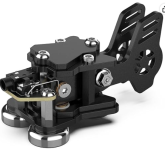
You don't need to lay out $300 on a Begali or N3ZN key though. The $40-$70 round Putikeeg model, or the generic "double paddle" iambic paddles (picture attached below), both available on Amazon, are adequate to start with, and used Bencher BY-1 keys (and a multitude of clones) are widely available on the used market as well. I would avoid plastic, 3D printed, or "mini" keys initially, as they tend to have wildly variable quality, and can all add complications that will be difficult for you to detect as a new CW op, but which may significantly slow your progress and lead to bad habits.
In addition to a key, you'll need a practice oscillator/keyer, or a radio with a built in keyer. Most modern radios can be put into a practice mode where it generates the sidetone, but does not actually transmit, and some even have a decoder that will help you improve your accuracy. Another option is a Winkeyer, nanoKeyer, or a DIY K3NG Keyer, all of which can be plugged into your PC via a USB port and which can send to a decoder app like Iambic Master, which can also gamify sending. There are also standalone practice keyers with decoders such as the Hamcube however at that price ($90, don't bother with the pro version), the built in code practice oscillator and decoder in the QRP Labs QCX+ ($57 as a moderate skill level kit, or $100 assembled) becomes a highly appealing option, as you also get an extremely good 5 watt single band CW rig along with a very competent decoder. If you want to go the QCX route and need build assistance, contact me directly and I'll be happy to help.
Once you have a key, oscillator, and ideally some way to decode your sent CW, it's time to send! This video from K9KJ is a good primer on basic form and how iambic keying works. Sending style is quite variable and personal, so I will try to avoid being prescriptive. I have seen some truly weird grips used by operators who can send circles around me, and I myself send "reversed", with the dit on the finger and the dah on the thumb, so I will only recommend that you observe the same basic ergonomic rules that you would for using a PC keyboard and mouse. Place the key in a position where your arm can rest comfortably on the desk in a relaxed position, while you are seated with good but comfortable posture. Avoid leaning on the elbow of your sending hand, and endeavor to keep a relaxed hand, wrist, elbow, and shoulder. Tension is not your friend. Especially early on, remember the mantra "Slow is smooth, smooth is fast". You'll be faster overall, especially early on, if you emphasize high accuracy (few repeats, few corrections) over high raw speed. Sending at 30wpm isn't much good if you're throwing corrections every 5 or 10 characters.
I recommend starting to send in the 15-20wpm range and adding farnsworth spacing as needed. Particularly with iambic paddles, after a (usually pretty short) initial familiarization period, you'll find that your sending speed will increase much faster than your sending accuracy does. Similar to the "90% rule" on LCWO, resist the urge to increase sending speed until you are sending and spacing cleanly and uniformly.
When you are just starting to send, sending text as you read it off of a screen or sheet of paper is fine, but I strongly recommend starting to send without reading as soon as you possibly can. This can be challenging if you aren't confident enough to get on the air yet, as it's difficult to think of new text to send. I've found that trivia cards or websites are a particularly good practice tool, as they are interesting in and of themselves, and also provide you with easy fodder for sending. Read the question, send your best guess (if you have no idea, just make an absurd guess, the point is to send text, not get it right!), then read the actual answer. If you got it wrong (or severely misspelled it), send the correct answer. I used The Jeopardy Archive, as well as Trivial Pursuit cards, but any pub trivia app or similar would work as well. Favorite quotes, poems, song lyrics, bible passages, or rants about your boss and co-workers are equally good practice, so long as you aren't sending the same thing over and over.
Once you have very basic sending competency, I recommend listening to, and then practicing the standard POTA exchange so you can get on the air ASAP. POTA is an outstanding way to cut your teeth on sending. While the exchange may be fairly long from the station calling CQ, the info you need to copy from them is very limited, and the hunting station can keep it very simple. POTA stations also tend to be wonderfully patient and accomodating of new operators in general. They'll let you stumble and fumble through the contact as long as you need to, where a contest or DX station with a pileup may only give you 2-3 repeats and then leave. Below is a sample POTA QSO between myself and Will Roush. We'll assume that I (AB3I) as the activator, am an experienced CW op, and Will is relatively new. The complexity of what we send will reflect that. Park number is not usually exchanged during a CW POTA QSO, which simplifies the info you need to copy. The "translation" is shown right of the bar |.
Code:
[SIZE=5]<Dave> CQ POTA de AB3I

<Will> W3UWU

<Dave> W3UWU de AB3I. GA UR 5NN 5NN GA GA BK    |   "Good Afternoon, You are 599 599 in Georgia Georgia, Back to you"

<Will> R R TU UR 55N 55N TN TN BK          |  "Roger Roger, Thank You, You are 559 559 in Tennessee, Tennessee, Back to you"

<Dave> W3UWU de AB3I RR TU ES FB OM. 73s de AB3I QRZ POTA   DIT   DIT         |     "Roger Roger Thank you and Fine Business old man, 73s from AB3I and QRZ DIT DIT"

<Will> E   E    |    "DIT   DIT"[/SIZE]
You can listen to a couple of contacts before calling and already have all the information you need to copy, so your only focus can be on sending. Practice sending Will's exact exchange regularly for a couple days before you go on the air, and it will quickly feel like second nature. The only thing that is more than a prosign or shorthand that is easily looked up online is the "DIT DIT". This is a sort of "tip of the hat" gesture that folks sending by hand often give at the very end of their last over, especially if the other operator showed particular patience or skill in the contact. It is sent as E E but with an extra space or so in between them.
At this point you've got the basics, now it's time to get on the air!